Keep the pace and be with time.

敲敲敲可爱の学习笔记


  • 首页
  • 归档
  • 分类
  • 标签
  •     

© 2018 敲敲KnocKnocK

Theme Typography by Makito

Proudly published with Hexo

LPy3THW · 笨方法更快 | 更新中……

发布于 2018-07-17 编程  Python 考研 

ex1 | print

1
2
print("I 'said' do not touch this.")
print('I "said" do not touch this.')
1
2
I 'said' do not touch this.
I "said" do not touch this.

p.s. 两种方法均可使用;需要注意的是,如出错误情况,会显示出错的行数,错误一般在此行或者之前。

ex2 | 注释和#号

1
print("Hi # there.")

p.s.

  • 这里的#没被忽略掉是因为它在”引号”里面
  • -*- coding:utf-8 -*- 如果是python 2 会需要这行代码,不过python 3 就没必要了。
  • 虽然#表示注释,但上面的代码还是会起作用,这中方法能让字符编码格式被识别

ex3 | 数字和数学计算

1
2
print(100 - 25 * 3 % 4)
# %表示除余部分

在powershell中表示如下

1
97

p.s. 97 = 100 - (75 - 4 * 18)

ex4 | 变量和命名

命名时,多个单词之间需要加下滑线,如:

1
2
# How much space is there in a car; this is a floating point.
space_in_a_car = 4.0

ex5 | 更多的变量和打印

1
2
3
4
5
6
7
8
9
10
11
12
13
14
15
16
17
18
my_name = '敲敲敲可爱'
my_age = 22 # Not a lie
my_height = 5.5 # feet
my_weight = 55 # kilograms
my_eyes = 'Black'
my_teeth = 'White'
my_hair = 'Black'

print(f"Let's talk about {my_name}.")
print(f"I'm {my_height} feet tall.")
print(f"I'm {my_weight} kilograms heavy.")
print("我觉得我不太胖。哈哈哈。")
print(f"I've got {my_eyes} eyes and {my_hair} hair.")
print(f"My teeth are usually {my_teeth} depending on the nothing.")

# this is line is tricky, try to get it exactly right
total = my_age + my_height + my_weight
print(f"If I add {my_age}, {my_height}, and {my_weight} I get {total}.")
1
2
3
4
5
6
7
Let's talk about 敲敲敲可爱.
I'm 5.5 feet tall.
I'm 55 kilograms heavy.
我觉得我不太胖。哈哈哈。
I've got Black eyes and Black hair.
My teeth are actually White depending on the coffee.
If I add 22, 5.5, and 55 I get 82

p.s.

%s 表示文本;
%d 表示数字;
%f 表示浮点(小数点后很多位);
%.2f 表示小数点后显示两位;
%.1f 表示小数点后显示一位;
%.f 表示四舍五入(如:5.5 显示为 6;而普通浮点是去掉小数部分)
显示中文和其他语言,需要在代码顶端输入# -*- coding: utf-8 -*-(有没有*都可以);并且中文前面要加u(如:my_name = u'敲敲敲可爱')——在python 3 里面没有必要
Python 3 输入print 一定不要忘了括号()——血的教训

ex6 | 字符串和文本

1
2
3
4
hilarious = False
joke_evaluation = "Isn't that joke so funny?! {}"

print(joke_evaluation.format(hilarious))

p.s.
False 不能当作变量;
String 是字符串,其中可以包括文本和变量,之前使用过的叫做f-string(如下)

1
2
f"some stuff here {avariable}"
f"some other stuff {anothervar}"

?

.format(hilarious)是干什么的?
答:https://app.yinxiang.com/shard/s72/nl/14362313/70ddf385-e965-458e-a3e4-59bbb491c030

ex7 | 更多打印

1
2
3
4
5
6
7
8
9
10
11
12
13
14
15
16
print("Its fleece was white as {}.The lamb was {} pounds heavy and born on {}.".format('snow', 123, 5.12))

end1 = "C"
end2 = "h"
end3 = "e"
end4 = "e"
end5 = "s"
end6 = "e"
end7 = "B"
end8 = "u"
end9 = "r"
end10 = "g"
end11 = "e"
end12 = "r"
print(end1 + end2 + end3 + end4 + end5 + end6, end = ' ')
print(end7 + end8 + end9 + end10 + end11 + end12)

p.s.
,end = ' ' 代表空格
format 后面小括号有几个值,前面就得有几个花括号,要和花括号对应

ex8 | 打印,打印

1
2
3
4
5
6
7
8
9
10
11
12
13
# 不要忘了ex7的注意,format 后面小括号有几个值,前面就得有几个花括号,要和花括号对应
formatter = "{} {} {} {}"

print(formatter.format(1, 2, 3, 4))
print(formatter.format("one", "two", "three", "four"))
print(formatter.format(True, False, False, True))
print(formatter.format(formatter, formatter, formatter, formatter))
print(formatter.format(
"Oh little pattington",
"Daddy won't be around you anymore.",
"So please take care of yourself",
'Remember daddy loves you.'
))

终端显示如下:

1
2
3
4
5
1 2 3 4
one two three four
True False False True
{} {} {} {} {} {} {} {} {} {} {} {} {} {} {} {}
Oh little pattington Daddy won't be around you anymore. So please take care of yourself Remember daddy loves you.

ex9 | 打印,打印,打印

1
2
3
4
5
6
7
8
9
10
11
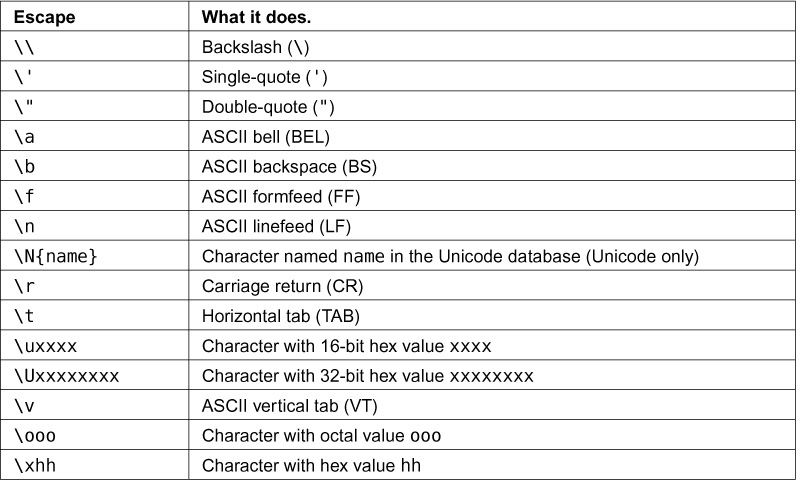
# \n代表换行,有点跟正则表达差不多
months = "\nJan\nFeb\nMar\nApr\nMay\nJun\nJul\nAug"
print("Here are the months: ", months)

print("""
There's something going on here.
With the three double-quotes.
We'll be able to type as much as we like.
Even 4 lines if we want, or 5, or 6.
三引号,可以进行多行编辑,并且可以同时使用单引号和双引号"''"
""")

终端显示如下:

1
2
3
4
5
6
7
8
9
10
11
12
13
14
15
Here are the months:
Jan
Feb
Mar
Apr
May
Jun
Jul
Aug

There's something going on here.
With the three double-quotes.
We'll be able to type as much as we like.
Even 4 lines if we want, or 5, or 6.
三引号,可以进行多行编辑,并且可以同时使用单引号和双引号"''"

ex10 | 那是什么?转义字符

示例:

1
2
3
4
5
6
7
8
9
10
11
12
13
14
15
tabby_cat = "\tI'm tabbed in."
persian_cat = "I'm split\non a line."
backlash_cat = "I'm \\ a \\ cat."

fat_cat = """
I'll do do a list:
\t* Cat food
\t* Fishies
\t* Catnip\n\t* Grass
"""

print(tabby_cat)
print(persian_cat)
print(backlash_cat)
print(fat_cat)

终端显示如下:

1
2
3
4
5
6
7
8
9
10
        I'm tabbed in.
I'm split
on a line.
I'm \ a \ cat.

I'll do do a list:
* Cat food
* Fishies
* Catnip
* Grass

练习:
CSDN 哈哈餐馆博客

ex11 | 提示别人,input()打印提示

1
2
3
4
5
6
7
8
print("How old are you?", end=' ')
age = input()
print("How tall are you?", end=' ')
height = input()
print("How much do you weight?", end=' ')
weight = input()

print(f"So, you're {age} old, {height} tall and {weight} heavy.")

p.s.
通过 input 提示打印,可以输入答案,最后一段会根据答案进行变化

ex12 | input()打印提示

1
2
3
4
height = input("How tall are you?")
weight = input("How much do you weight?")

print(f"So, you're {age} old, {height} tall and {weight} heavy.")

p.s.
input()命令需要用户在终端自行输入信息

ex13 | 参数、解包、变量

from sys import argv

script, 1, 2, 3 = argv

1
2
3
4
5
6
7
8
9
10
11
12
13
14
15
# This is how you add features to your script from the Python feature set. And this keeps your programs small, but it also acts as documentation for other programmers who read your code later.
from sys import argv
# read the WYSS for how to run this
script, first, second, third = argv
# This is a debug line.
print(">>>>> argv=", repr(argv))

script = input()
print("The script is called:", script)
first = input()
print("Your first variable is:", first)
second = input()
print("Your second variable is:", second)
third = input()
print("Your third variable is:", third)

p.s.
print(">>>>> argv=", repr(argv))这是Zed常用的debug命令
!输入参数时,代码里面有几个就输入几个,多输入或少输入都会提示错误

练习答案与解析 —— CSDN博客

ex14 | 提示和传递

prompt = ‘>>> ‘

likes = input(prompt)

1
2
3
4
5
6
7
8
9
10
11
12
13
14
15
16
17
18
19
20
from sys import argv
script, user_name = argv
prompt = '>>>> '

print(f"Hi {user_name}, I'm the {script} script.")
print("I'd like to ask you a few questions.")
print(f"Do you like me {user_name}?")
likes = input(prompt)

print(f"Where do you live {user_name}?")
lives = input(prompt)

print("What kind of computer do you have?")
computer = input(prompt)

print(f"""
Alright, so you said {likes} about likeing me.
You live in {lives}. Not sure where that is.
And you have a {computer} computer. Nice.
""")

p.s.
别忘了,三个引号"""的作用是表示多行信息

ex15 | 读取文件

txt = open(filename)

print(txt.read())

1
2
3
4
5
6
7
8
9
10
11
12
13
14
15
16
17
# 这次的练习很容易迷糊,需要多次复习!尝试自己再写一遍!
from sys import argv

script, filename = argv

txt = open(filename)

print(f"Here's your file {filename}:")
print(txt.read())

print("Type the filename again:")
# 上半部分不需要input()是因为agrv,需要注意~
file_again = input("> ")

txt_again = open(file_again)

print(txt_again.read())

p.s.
输入文件名时,需要准确无误,否则会提示错误
别忘了print(f"Here's your file {filename}:")里面的f

###尽量多看,多练习下面的练习
练习答案与解析 —— CSDN博客

ex16 | 读写文件

target = open(filename, “w”)

target.truncate()

target.write(line1 + n + line2 + n + line3)

1
2
3
4
5
6
7
8
9
10
11
12
13
14
15
16
17
18
19
20
21
22
23
24
25
26
27
from sys import argv
script, filename = argv

print(f"We're gong to erase {filename}.")
print("If you don't want that, hit CTRL-C (^C).")
print("If you do want that, hit RETURN.")

input("?")

print("Opening the file...")
# open()默认的参数是open(file, "rt"), 也就是读取文件内容,没有写入的功能,所以需要改成"w"。
target = open(filename, "w")

print("Truncating the file. Goodbye!")
target.truncate()

print("Now I'm going to ask you for three lines.")
n = "\n"
line1 = input("line 1: ")
line2 = input("line 2: ")
line3 = input("line 3: ")
# 内容简化,比教材中的要简单的多
target.write(line1 + n + line2 + n + line3)

# Zed说:尽量养成关闭文件的习惯,避免日后写大程序的时候,出现信息泄露的风险
print("And finally, we close it.")
target.close()

p.s.

在终端运行时,一定不要忘了输入文件名,比如:python ex16.py test.txt

练习 | 写一个读取脚本

解析与答案 —— CSDN博客
我的练习:

1
2
3
4
5
6
7
8
9
from sys import argv
script, filename = argv

# 还是那句话,不要忘了f
print(f"{script} is reading {filename}...")

print("The content is down below:")
file_open = open(filename)
print(file_open.read())

ex17 | 更多文件操作

from os.path import exists

print(“{exists(to_file)}”)

1
2
3
4
5
6
7
8
9
10
11
12
13
14
15
16
17
18
19
20
21
22
23
24
25
26
27
28
29
30
31
32
# 引入库
from sys import argv
from os.path import exists

# 解包参数
script, from_file, to_file = argv

# 打印任务目标
print(f"Copying from {from_file} to {to_file}")

# we could do these two on one line, how? 如何把这两行写到一行?
in_file = open(from_file)
indata = in_file.read()

# 打印文件字符长度
print(f"The input file is {len(indata)} bytes long")

# !!!这里是关键,检测目标文件是否存在,不要忘了input()
print(f"Does the output file exist? {exists(to_file)}")
print("Ready, hit RETURN to continue, CTRL-C to abort.")
input()

# 以写入模式打开目标文件
out_file = open(to_file, "w")
# 写入复制的内容
out_file.write(indata)

# 打印“操作完成”,实际上,打印这句话的时候并没有完成
print("Alright, all done.")
# 关闭文件,至于为什么,参考ex16;这里才是真正保存到硬盘
out_file.close()
in_file.close()

p.s.

{exists(to_file)}注意不要写错,练习的时候错了很多遍
每个步骤的功能注释别忘了看

?

作业练习与解析 —— CSDN博客
精简之后的代码为什么执行失败,需要再研究一下

ex18 | 命名、变量、代码、函数

1
2
3
4
5
6
7
8
9
10
11
12
13
14
15
16
17
18
19
20
21
# this one is like your scripts with argv
def print_two(*args):
arg1, arg2 = args
print(f"arg1: {arg1}, arg2: {arg2}")

# ok, that *args is actually pointless, we can just do this
def print_two_again(arg1, arg2):
print(f"arg1: {arg1}, arg2: {arg2}")

# this just takes one argument
def print_one(arg1):
print(f"arg1: {arg1}")

# this one takes no arguments
def print_none():
print("I got nothin'.")

print_two("超", "可爱")
print_two_again("超", "可爱")
print_one("First!")
print_none()

终端显示如下

1
2
3
4
5
PS C:\Users\Administrator\mystuff> python ex18.py
arg1: 超, arg2: 可爱
arg1: 超, arg2: 可爱
arg1: First!
I got nothin'.

p.s.

这一练习可能有点不理解,不过没关系,Zed说多练习,学着破坏代码,在之后的练习中会介绍更多

ex19 | 函数和变量

cheese_and_crackers(20, 30)

cheese_and_crackers(amount_of_cheese, amount_of_crackers)

cheese_and_crackers(amount_of_cheese + 100, amount_of_crackers + 1000)

1
2
3
4
5
6
7
8
9
10
11
12
13
14
15
16
17
18
19
20
21
22
23
24
25
26
27
28
29
# 给cheese_and_crackers 下定义,创建一个function
def cheese_and_crackers(cheese_count, boxes_of_crackers):
print(f"You have {cheese_count} cheese!")
print(f"You have {boxes_of_crackers} boxes of crackers!")
print("Man that's enough for a party!")
print("Get a blanket. \n")


# 直接输入参数,进行运算
print("We can just give the function numbers directly:")
cheese_and_crackers(20, 30)


# 以变量方式传入数据进行运算
print("Or, we can use variables from our script:")
amount_of_cheese = 10
amount_of_crackers = 50

cheese_and_crackers(amount_of_cheese, amount_of_crackers)


# 参数内可以进行数学运算
print("We can even do math inside too:")
cheese_and_crackers(10 + 20, 5 + 6)


# 数字和变量可以同时参与运算
print("And we can combine the two, variables and math:")
cheese_and_crackers(amount_of_cheese + 100, amount_of_crackers + 1000)

p.s.

函数中的变量既可以是数字、参数,也可以是数字和参数的组合,进行运算也可以

ex20 | 函数和文件

f.seek(0)

print(line_count, f.readline())

1
2
3
4
5
6
7
8
9
10
11
12
13
14
15
16
17
18
19
20
21
22
23
24
25
26
27
28
29
30
31
32
33
34
35
36
from sys import argv
script, input_file = argv

# 第一个函数用于打印整个文档
def print_all(f):
print(f.read())

# 第二个函数用来重置指针,把指针放到文件开头位置
def rewind(f):
f.seek(0)

# 第三个函数用于打印指定行内容
def print_a_line(line_count, f):
print(line_count, f.readline())

# 要.read()文件首先要open才能打印出来
current_file = open(input_file)

# 首先打印全文
print("First let's print the whole file:")
print_all(current_file)

# 打印之后的指针已经在文档末尾了,所以需要复位
print("Now let's rewind, kind of like a tape.")
rewind(current_file)

# 打印每行内容
print("Let's print three lines:")
current_line = 1
print_a_line(current_line, current_file)

current_line = current_line + 1
print_a_line(current_line, current_file)

current_line = current_line + 1
print_a_line(current_line, current_file)

p.s.

不要忘了open文件再打印其中内容
不要忘了定义函数的时候里面的f和冒号:def print_all(f):

课后练习与答案:
课后练习与答案 —— CSDN博客

+=是什么?及拓展

.seek()是什么?
虽然说博客里面有讲解但是还需要多看,有点没有理解

ex21 | 函数可以返回东西

1
2
3
4
5
6
7
8
9
10
11
12
13
14
15
16
17
18
19
20
21
22
23
24
25
26
27
28
29
30
31
32
33
def add(a, b):
print(f"ADDING {a} + {b}")
return a + b

def subtract(a, b):
print(f"SUBTRACTING {a} - {b}")
return a - b

def multiply(a, b):
print(f"MULTIPLYING {a} * {b}")
return a * b

def divide(a, b):
print(f"DIVIDING {a} / {b}")
return a / b


print("Let's do some math with just functions!")

age = add(30, 5)
height = subtract(78, 4)
weight = multiply(90, 2)
iq = divide(100, 2)

print(f"Age: {age}, Height: {height}, Weight: {weight}, IQ: {iq}")


# A puzzle for the extra credit, type it in anyway.
print("Here is a puzzle.")

what = add(age, subtract(height, multiply(weight, divide(iq, 2))))

print("That becomes: ", what, "Can you do it by hand?")

?

用其他方法求出what

分享到 

 上一篇: 失眠是常事……这样非常影响学习! 下一篇: 乐活之城:阿姆斯特丹的嬉皮往事 

© 2018 敲敲KnocKnocK

Theme Typography by Makito

Proudly published with Hexo